
Important Note
The software supports these devices:
- Samsung S9 Korean version (SM-G960N) and S9 International version (SM-G960F).
- Samsung S9+ Korean version (SM-G965N) and S9+ International version (SM-G965F). For the International version, occasionally there are some devices that cannot be installed (very rare).
I.How to Distinguish S9 / S9+ Korean & International
To accurately check which S9 version you are using, follow these steps to enter Download Mode:
1Step 1: Power Off
Turn off the phone completely.
2Step 2: Enter Standby Mode
Hold 3 buttons simultaneously: Bixby + Power + Volume Down. (The Bixby button is the button below the Volume Down button).
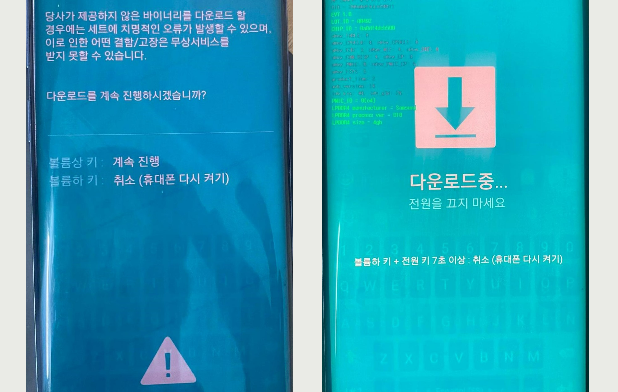
You will see a turquoise warning screen (as shown in the left image below).
3Step 3: Enter Download Mode
Press Volume Up to proceed to DOWNLOAD MODE (as shown in the right image below).
How to Identify on Download Mode Screen:
- KOREAN VERSION (SM-G960N / SM-G965N): You will see Korean text appear on the screen.
- INTERNATIONAL VERSION (SM-G960F / SM-G965F): On the top left corner of the screen, there will be the text:
PRODUCT NAME: SM-G960ForPRODUCT NAME: SM-G965F.
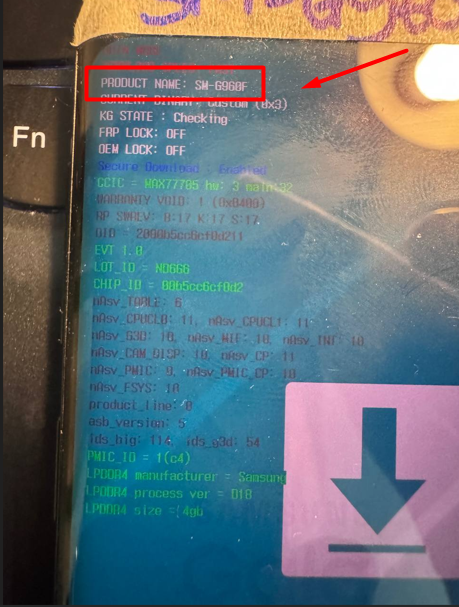
(Please see the illustration below)